How Grid Rates works
Figures on this page are examples, not live rates. Live plans live at /compare; the current plan count is on /data.
Where the data comes from
Retailers in Australia's National Electricity Market must publish every residential and small-business electricity and gas plan they offer. Grid Rates reads that published plan data directly and keeps it current, so a plan appears here whether or not the retailer promotes it on their own site. /data shows how many plans are currently indexed.
"Every plan" covers every market offer and every standing offer a retailer publishes, for every state and territory that runs retail competition: New South Wales, Victoria, Queensland, South Australia, Tasmania and the ACT. A standing offer is the regulated default rate a customer is billed at if they have never actively chosen a plan. It is included alongside market offers, not hidden, because plenty of households are quietly paying it. Western Australia and the Northern Territory run regulated retail markets with a single government-owned retailer and no competition, so there is no published plan data to read there and they are not shown yet. Some regional or embedded networks may also be missing plans we don't index yet.
A postcode maps to one or more electricity and gas distribution networks. These are the poles-and-wires or pipeline companies, distinct from the retailer who bills you. The network boundary is drawn by infrastructure, not by postcode lines. Most postcodes sit entirely inside one network, so a house on that postcode is on exactly one. Roughly a fifth straddle a boundary between two distributors, and rates genuinely differ between them, so /compare asks which one your house is on. It is printed on your bill, under supply details or the faults number. Every published plan on Grid Rates is priced for a specific network, never averaged across one.
When a retailer withdraws a plan, Grid Rates marks it retired rather than deleting it. A retired plan keeps its full price history, so a household still on one can see exactly how its rates have moved since it was withdrawn. Retired plans are excluded from the default comparison unless you switch on the "show retired plans" filter. Comparing below shows where that filter lives.
Reading your bill
Every field on an electricity bill maps to something Grid Rates either reads automatically (see uploading a bill) or asks you for directly on /compare. The example below is a fabricated bill from a fictional retailer, "Northbank Energy", for a fictional customer. No real account, no real address, no real rates. The fourteen fields that matter are numbered, and each one is explained underneath.
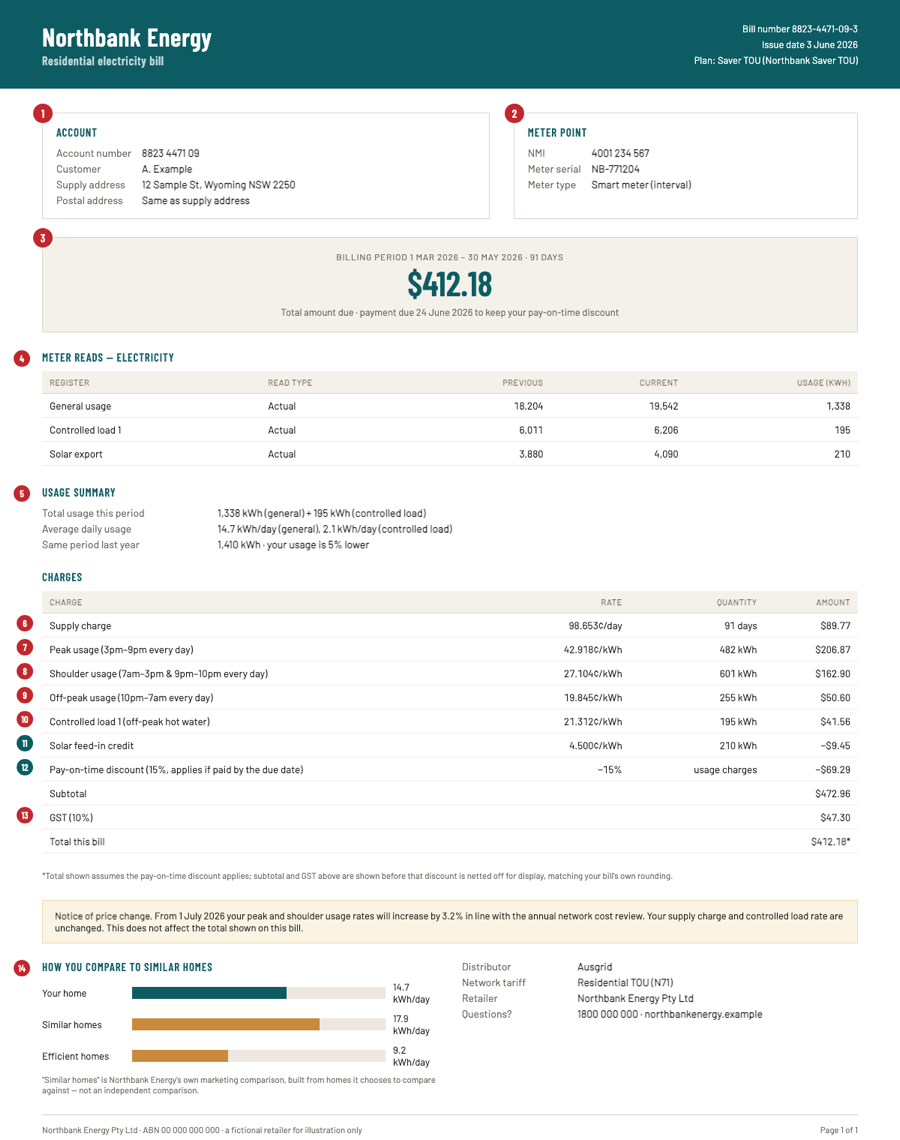
- 1Account numberIdentifies your billing relationship with the retailer. It changes if you switch retailers, unlike the NMI below.
- 2NMIThe National Metering Identifier. These 10 to 11 digits identify the physical meter point at your address; gas has its own equivalent, the MIRN or DPI. The NMI belongs to the property, not the account, so it never changes when you switch retailer. That is why it is the safest thing to quote when reporting a fault or requesting your own usage data.
- 3Billing periodThe number of days the bill covers, 91 in the example, a typical quarter. Every rate on the bill is applied across that many days. Comparing two bills of different lengths by their total dollar figure is misleading; compare the daily or annual rate instead.
- 4Meter reads"Actual" means the meter was physically read this period, or reported remotely by a smart meter. "Estimated" means the retailer guessed from your history because no read was available. An estimated read can be wrong in either direction and gets corrected on a later bill once an actual read comes in, sometimes as a large adjustment.
- 5UsageTotal kWh consumed in the period, or MJ for gas, plus the average daily usage the retailer derives from it. That daily average, multiplied out to a year, is the number the usage box on /compare expects.
- 6Supply chargeA flat cents-per-day charge billed regardless of how much power you use. It keeps the meter connected. It is also the number most people never look at, even though on a low-usage bill it can be a large share of the total.
- 7–9Peak / shoulder / off-peakTime-of-use rates. A different cents-per-kWh price depending on when the electricity was used, each with its own clock and day-of-week window printed on the bill, such as peak 4pm to 9pm every day. A flat-rate plan skips this entirely and bills every kWh at one rate.
- 10Controlled loadA separate, usually cheaper, rate for a circuit the retailer switches on a timer. Almost always an off-peak hot water system on its own meter channel.
- 11Solar feed-inA credit, in cents per kWh, for electricity your solar system exported to the grid rather than used on-site. It is a credit line, not a rate you pay.
- 12Discounts and conditionsA pay-on-time or direct-debit discount only applies if you meet the printed condition on every single bill. Miss one and that bill loses the discount. This is the most common gap between a plan's advertised rate and what people actually pay, and exactly what the hide-filters on /compare are built to expose.
- 13GST10%, included in the prices you pay. Some bills print each rate with GST already in it and some add a GST line at the end; either way, /compare shows every rate and estimate with GST included unless you untick it. When you type your own rates, enter them including GST.
- 14Distributor and comparison boxThe distributor named on the bill, "Ausgrid" in the example, is the network your address is physically on. It never changes when you switch retailers, only when you move house. The "similar homes" comparison box is the retailer's own marketing, built from whatever they choose to compare against. It is not an independent comparison, which is the whole reason Grid Rates exists.
The plan name and any price-change notice are printed near the top of a real bill. They matter for one reason: what to look for when comparing is not the headline discount. It is the supply charge plus the usage rate, multiplied by your actual usage. A big discount off an inflated reference rate can still cost more than a plain plan with no discount at all.
Comparing your bill with what's available
The fastest path through /compare: search your suburb, confirm your network if the postcode straddles two, pick residential or small business, pick electricity or gas, and set your usage from your bill. If you leave the usage blank, the household model estimates it for you. Set the billing period and whether GST is included, then pick your current plan so a "vs current" column appears. Read the estimate column and click a row to see that plan's full rates and 24-month price history. Sort by any column by clicking its header. Every control is explained below.
- Location
- Type a suburb or postcode into the search box. Picking a result resolves your electricity and gas network. When a postcode maps to more than one network for a fuel, a select appears asking which one your house is on; how it works explains why. When it doesn't, the single network shows as plain text.
- Customer
- Residential or small business. Small business swaps in the 15,000 kWh / 60,000 MJ default usage and drops the controlled-load column, since almost no business tariff carries one.
- Fuel
- Electricity or gas. Each fuel keeps its own usage figure, current plan and network choice, so flipping back and forth never loses what you typed for the other one.
- Electricity / gas estimate basis
- The usage field, in kWh for electricity and MJ for gas, drives every estimate in the table. So does the period it is expressed in: day, month, quarter or year. Changing the period converts the figure, it never resets it. The figure is spelled out per day, month, quarter and year so you can check it against any bill. Under "Estimate includes", "GST" is ticked by default, so every rate and estimate includes it, the way prices are quoted; untick it to see them without. "Conditional discounts" folds a plan's pay-on-time or direct-debit discount into its estimate. That one is off by default, because those discounts depend on your behaviour and are not guaranteed. "Show retired plans" brings withdrawn plans back into the table for households still on one. "Your current plan" is a select of every plan in the table; once it is set, a "vs current" column shows exactly how much you would save or lose switching to each row.
- Show plans with
- Ten checkboxes, each with a live count, one per plan trait: conditional discounts, pay-on-time terms, direct-debit-only billing, sign-up credits, exit fees, lock-in contracts, bundle-only deals, GreenPower add-ons, wholesale pass-through pricing and controlled-load rates. All are ticked to start. Unticking one removes every plan carrying that trait. None of them is inherently bad, so this filters on what you are willing to deal with. It is never a judgement on the plan.
- Tariff type
- Flat, time-of-use (TOU) and demand for electricity; flat and tiered for gas. Unticking a type removes every plan billed that way. This is useful if your meter cannot support time-of-use billing at all.
- Show columns
- Four toggleable bands beyond the identity columns that are always shown (retailer, plan, tariff, network, estimate): rates, meaning every published cents-per-kWh or cents-per-MJ figure; discounts and conditions; contract terms, covering fixed or variable, contract length, exit fee and GreenPower; and metadata, covering plan status and last rate change. A plan's price history is on the row itself: click it for the full chart and every rate change behind it.
- Household
- The strip above the table covers people, air conditioners, an EV, hot water, cooking and heating fuel, plus solar, battery and EV battery toggles. It seeds a usage estimate when you have not typed one, so there is always a sensible number on the page instead of a blank field. Typing a usage figure yourself overrides it, and a "re-apply" link brings the household estimate back.
- The URL
Every control above lives in the address bar, nowhere else. There is no hidden session state. A comparison is a link you can bookmark, paste into a message, or hand to someone else, and it loads back exactly as you left it. That also makes a shared comparison trustworthy in a way a screenshot is not: nothing about the numbers depends on a login, a browser, or a moment in time, only on the parameters written into the link itself.
This is also why sorting, filtering and paging never lose your place. Clicking a column header or ticking a hide-filter box changes the URL, so the browser's own back button steps back through your filter history exactly as you would expect, without Grid Rates needing to remember anything about you.
Saving money by rotating plans
Retailers price new customers below existing ones, because winning an account costs money to advertise for and keeping an inattentive one costs nothing. A plan's headline discount is usually pegged to a reference rate the retailer sets and can move, so a "20% off" plan can quietly get more expensive while the discount percentage stays the same. Nobody is going to write and tell you a better plan appeared. The market is built on the assumption that most people will not check.
Check every 12 months. If you are on a market offer whose discount only runs for a fixed benefit period, often just the first year, mark the date it ends and compare again before it lapses. Switching itself is simple. Your new retailer handles the transfer with your old one, there is no disconnection, and a cooling-off period lets you cancel a switch you have changed your mind about.
Before switching, check three things on your current plan: an exit fee for leaving before a fixed contract term ends, any sign-up credit whose terms claw the money back if you leave early, and whether your best rate depends on direct-debit-only billing you may not want to keep. None of this is a reason not to switch. It is the arithmetic to do first. Read the exit fee and credit terms, compare on your actual annual usage rather than the headline number, then set a reminder for the next review.
Compare like for like. A plan with a lower headline usage rate but a higher supply charge can cost more for a low-usage household and less for a high-usage one. The estimate column on /compare already does that arithmetic at your own usage figure, so there is nothing to work out by hand. The same applies to time-of-use against flat rate. A household that mostly uses power in the evening peak can come out worse off on a TOU plan even when its off-peak rate looks cheap, because the peak rate does most of the work in the total.
Rotating plans costs nothing and carries little risk. The transfer is handled retailer to retailer, your supply is never interrupted, and the cooling-off period exists precisely so a hasty switch can be undone. The only real cost is the few minutes it takes to run the comparison, which is the entire reason this table exists.
Uploading a bill
The drop zone on the home page reads an uploaded bill PDF with a deterministic, per-retailer parser. There is no AI or language model involved anywhere in Grid Rates, on this page or any other. Each retailer lays its bill out differently, so a parser has to be built and tested against that retailer's actual layout before it works. Today that covers a growing list of major retailers, and more are added as their formats are built into the parser set.
When a bill's format is not supported yet, the upload fails gracefully. The page says so plainly and offers an optional, one-time email notification for when that format is added, rather than pretending the bill was read. That address is used for exactly one message and nothing else.
What gets read: the billing period, usage, published rates, plan name and NMI. These are the same fields explained in reading your bill above. The extracted usage and current plan seed a comparison on /compare immediately. A bill that reads is not stored, and the NMI is dropped from what was extracted. A bill that doesn't read comes with a question: whether we can keep it for 7 days to build a parser for its layout. Yes keeps it for that week and then deletes it; no means it is never stored. When a bill's own usage history spans more than one season, that history weights the annual estimate instead of one period being multiplied out, because usage swings with the seasons more than a single quarter suggests.
Most retailers that sell both fuels issue one PDF covering electricity and gas. A combined bill like that is read once and seeds both fuels' usage figures at the same time, so flipping the fuel toggle on /compare after an upload never asks for a second file. Nothing about the upload requires an account. A bill can be dropped anonymously and its extracted figures carried through the compare URL for that one session, exactly like typing them in by hand. Logging in only changes what happens afterwards: an account keeps the extracted figures attached so they are there next time, covered in logging in below.
Logging in
An account exists only to carry your own settings between visits and devices. Nothing about using Grid Rates requires one. Signing in uses a login link sent to your email address. There is no password to choose, remember or leak. Once you are logged in, an account stores your latest uploaded bill per fuel and your saved comparison settings, so returning to /compare on another device picks up where you left off.
There is no login prompt anywhere on the home page or the compare table. The only entry points are the /login page itself and a dimmed "account" link in the footer. Deleting an account removes your saved comparison and every bill you uploaded, extracted details included.
This is the smallest possible account. There is no profile to fill in, no preferences beyond what a comparison already carries in its own URL, and nothing to configure before it is useful. It does two things: it carries your latest bill and your saved comparison between devices. A visitor who never logs in loses none of the comparison itself. They only lose the convenience of picking up where they left off somewhere else.
Frequently asked questions
- Is Grid Rates really free?
- Yes. There are no fees, paywalls, ads, affiliate links or referral fees from retailers anywhere on the site. Logging in is optional, and free too.
- What shape is this?
- A spreadsheet. Every published plan for a suburb in one sortable table, every rate as its own column, every retailer condition as an on/off filter with a live count, and your own usage figures plugged straight in so the estimates are yours rather than a standard household's.
- How current is the data?
- Plan data is kept current from the plan data every retailer is required to publish.
- What does "every plan" mean?
- Every electricity and gas plan every retailer is required to publish, market and standing offers included, for every state with retail competition. Western Australia and the Northern Territory run regulated markets with no retail competition and are not covered yet. See /docs for the full list of coverage caveats.
- How are the cost estimates calculated?
- From each plan's published supply charge and usage rates, applied to a household usage figure. You can enter that figure, extract it from an uploaded bill, or leave it to the default household model. See /data for the exact formula and /docs for how the household model works.
- What happens to a bill I upload?
- It is read programmatically to extract your usage and current plan. Nothing is sent to a person or a third party. A bill we can read is not stored. If we can't read it, we ask whether we can keep it for 7 days to build a reader for its format; it is deleted after that, and never stored if you say no.
- Do I need to sign up?
- No. Searching a suburb and comparing plans needs no account. Logging in is only useful if you want your compare settings and bill details to follow you between devices.
- Is my data private?
- Anonymous compares store nothing on our servers. Your settings stay in your browser. There are no ad trackers and nothing is sold. See /privacy for the full detail.
Glossary
Every term the table and the bills use, each as the question people actually ask. Hover any dotted term anywhere on the site for the short version.
- Battery
- How does a home battery change an electricity plan comparison?
A home battery stores electricity, usually generated by rooftop solar, for use later rather than exporting or drawing from the network at that moment. - Benefit period
- What is a benefit period on an energy plan?
A benefit period is a fixed length of time, often 12 months, a market offer's discount or credit applies for, after which the rate can change. - Bundle
- What is a bundle-only energy plan?
A bundle plan is only available when signing up for more than one service together, such as electricity and gas, or energy and broadband. - c/day
- What does c/day mean on an energy plan?
Cents charged per day regardless of usage, the unit a supply charge is billed in. - c/kWh
- What does c/kWh mean on an electricity plan?
Cents charged per kilowatt-hour of electricity used, the usual unit for an electricity usage rate. - c/MJ
- What does c/MJ mean on a gas plan?
Cents charged per megajoule of gas used, the usual unit for a gas usage rate. - CL1
- What does CL1 (controlled load 1) mean on an electricity plan?
CL1, controlled load 1, is a separately metered circuit, almost always the electric hot water system, that the network only powers for a limited number of hours a day, mostly overnight, in return for the cheapest rate on the bill. A CL1 tag after a plan name means that plan includes a CL1 rate. - CL2
- What does CL2 (controlled load 2) mean on an electricity plan?
CL2, controlled load 2, is a second separately metered circuit the network powers for more hours a day than CL1, often 16 or more, used for pool pumps, slab heating or larger hot water systems. Its rate sits between CL1 and normal usage. A CL2 tag after a plan name means that plan includes a CL2 rate. - Concession
- What is an energy concession?
A concession is a government rebate for eligible concession card holders, applied directly to the energy bill rather than the plan's rates. - Contract term
- What is a contract term on an energy plan?
The contract term is how long a plan locks you in for, if it's a fixed-term contract at all; many plans are variable with no fixed term. - Controlled load
- What is a controlled load on an electricity plan?
Controlled load is a separately metered circuit, usually the electric hot water system, that the network switches on for a set number of hours a day, usually overnight, at a cheaper rate than general usage. - CTL
- What does CTL mean on an electricity bill?
CTL is another name for controlled load: a separately metered circuit, usually the electric hot water system, that the network switches on for a set number of hours a day, usually overnight, at a cheaper rate. - Demand charge
- What is a demand charge on an electricity plan?
A demand charge is billed in dollars per kW based on the highest rate of electricity draw recorded in a billing period, rather than the total energy used. It's common on demand tariffs and most business plans. - Direct debit
- What does direct debit only mean on an energy plan?
Direct debit is automatic payment from a bank account; some plans require it to keep their best rate, and losing it can lose the discount. - DMO
- What is the DMO (Default Market Offer) reference price?
The Default Market Offer (DMO) is a regulator-set reference price, used in most states, that a retailer's market offer discount must be compared against. - E-billing
- What does e-billing mean on an energy plan?
E-billing is receiving bills by email or app rather than paper post; some plans require it to keep their best rate. - Embedded network
- What is an embedded network?
An embedded network is a private electricity network inside a site, such as an apartment block or caravan park, that buys power in bulk and on-sells it to residents rather than each resident having their own retailer contract. - EV
- What does EV mean on an electricity plan?
An electric vehicle (EV) charged from the household's electricity supply, which can meaningfully change a household's usage profile. - EV battery
- What does EV battery mean in the household estimate?
On this site EV battery means an electric car used as a feed-in battery: it discharges to the house or exports to the grid (vehicle-to-home, V2H, or vehicle-to-grid, V2G) and the exported energy earns the plan's feed-in tariff. The plain EV box is only about charging the car at home. - Exit fee
- What is an exit fee on an energy plan?
An exit fee is a charge for leaving a plan before its fixed contract term ends. - Export
- What does solar export mean on an electricity bill?
Export is solar electricity your system sends out to the grid rather than used on-site, and it's what earns the feed-in tariff credit. - Feed-in tariff
- What is a feed-in tariff for solar?
The cents-per-kWh credit paid for solar electricity exported to the grid. It's a credit line, not a rate you pay. - FiT
- What does FiT mean on an electricity plan?
FiT is short for feed-in tariff, the cents-per-kWh credit a retailer pays for solar electricity exported to the grid. - GST
- Is GST included in electricity and gas rates?
Goods and Services Tax (GST) is Australia's 10% tax. Energy prices are quoted with it included, for businesses too, so /compare shows every rate and estimate with it by default. Retailers publish their plan data without GST, so it is added at 10%; untick GST to see prices without it. - Interval meter
- What is an interval meter?
An interval meter records usage in short intervals (commonly 30 minutes) rather than a single total per billing period, which is what lets a retailer bill time-of-use rates accurately. - kW vs kWh
- What is the difference between kW and kWh?
kW (kilowatt) measures the rate of electricity draw at a given instant; kWh (kilowatt-hour) measures the amount of energy used over time. A demand charge is billed on kW; a usage charge is billed on kWh. - kWh
- What is a kWh on an electricity bill?
Kilowatt-hour: the standard unit of electrical energy usage. - Load profile
- What is a load profile and how is it used to estimate an electricity bill?
A load profile is a typical pattern of how a household's electricity use spreads across the hours of the day and days of the week. The estimate uses one to split your annual usage between a plan's peak, shoulder and off-peak windows, since a bill total alone does not say when the energy was used. - Market offer
- What is a market offer for electricity or gas?
A market offer is any plan a retailer actively markets and a customer opts into, as opposed to the standing offer. - MIRN / DPI
- What is a MIRN or DPI on a gas bill?
MIRN or DPI is gas's equivalent of the NMI, the meter identifier for a gas connection point, belonging to the property rather than the retailer account. - MJ
- What is an MJ on a gas bill?
Megajoule: the standard unit of gas energy usage. - Network / distributor
- What is the difference between an electricity network (distributor) and a retailer?
The network, or distributor (DNSP, Distribution Network Service Provider), owns the poles, wires or pipes that physically deliver energy to your address. It's distinct from the retailer, who bills you. - NMI
- What is an NMI on an electricity bill?
The National Metering Identifier (NMI) is a 10-11 digit code identifying the physical electricity meter point at your address. It belongs to the property, not the retailer account, so it never changes when you switch retailers. - Off-peak
- What is the off-peak rate on an electricity plan, and when does it apply?
Off-peak is the cheapest time-of-use window, typically overnight when overall demand on the network is lowest. The exact hours are set per network and per plan, and the plan's own printed times are what actually apply. - Pay-on-time discount
- What is a pay-on-time discount?
A pay-on-time discount only applies if you meet the printed condition every single bill; miss one and that bill loses the discount, the most common gap between a plan's advertised rate and what people actually pay. - Peak (on-peak)
- What is the peak rate on a time-of-use electricity plan, and when does it apply?
Peak, or on-peak, is the most expensive time-of-use window, typically weekday afternoon and evening (often around 3pm-9pm). The exact hours and days are set per network and per plan, and the plan's own printed times are what actually apply. - Reference price
- What is the reference price on an electricity plan?
The reference price is the DMO or VDO figure a market offer's advertised discount is measured against, rather than an actual bill you'd be charged. - Retailer
- What is an energy retailer?
The retailer is the company you have a contract with and pay; it buys electricity or gas and sells it to you at a published rate. Distinct from the network, which physically delivers it. - Seasonal tariff period
- What is a seasonal tariff period on an electricity plan?
A seasonal tariff period is a rate that changes between summer and winter (or other seasons) on the same plan, rather than staying constant year round. - Shoulder
- What is the shoulder rate on a time-of-use electricity plan?
Shoulder is the time-of-use window priced between peak and off-peak, usually daytime hours outside the morning and evening peaks. The exact hours are set per network and per plan, and the plan's own printed times are what actually apply. - Single rate / flat
- What is a single rate or flat electricity tariff?
A single rate, or flat, tariff bills every kWh at the same rate no matter when it was used, unlike a time-of-use tariff that varies the rate by time of day. - Smart meter
- What is a smart meter and why does it matter for electricity plans?
A smart meter reports usage remotely instead of needing someone to physically read it, and is what makes time-of-use billing possible. - Solar sponge
- What is a solar sponge tariff?
A solar sponge period is a cheap midday time-of-use window, on some plans, meant to encourage households to shift usage to the middle of the day when solar output across the network is highest. - Standing offer
- What is a standing offer for electricity or gas?
A standing offer is the regulated default rate a customer is billed at if they've never actively chosen a plan, as opposed to a market offer. - Supply charge
- What is the supply charge on an electricity or gas bill?
A supply charge is a flat cents-per-day charge billed regardless of how much power or gas you use, it's what keeps the meter connected. On a low-usage bill it can be a large share of the total. - Tariff
- What is a tariff on an electricity or gas plan?
A tariff is the rate structure a plan bills under: flat (one usage rate), tiered (rate changes with how much you use), time of use (rate changes with when you use it) or demand (an extra charge on your highest draw). - Tiered / block
- What is a tiered or block tariff on an electricity or gas plan?
A tiered, or block, tariff changes the usage rate once total usage in the billing period passes a threshold, common on gas plans, rather than charging one flat rate for every unit used. - TOU (time of use)
- What does time of use (TOU) mean on an electricity plan?
Time of use (TOU) is a tariff structure that bills a different cents-per-kWh rate depending on when the electricity was used, usually split into peak, shoulder and off-peak windows. A single flat-rate plan skips this and bills every kWh at one rate regardless of time. - TOU block
- What is a TOU block on an electricity plan?
A TOU block is one priced window of a time-of-use tariff, for example peak from 3pm to 9pm on weekdays, with its own cents-per-kWh rate. A plan lists several blocks that together cover every hour of the week. - Usage charge
- What is the usage charge on an electricity or gas bill?
The cents-per-kWh (or cents-per-MJ for gas) rate applied to how much energy was actually used. - V2G / V2H
- What do V2G and V2H mean for an electric car?
Vehicle-to-Grid (V2G) and Vehicle-to-Home (V2H) let an electric vehicle's battery supply power back to the grid or directly to the house, rather than only charging. - Variant
- Why does the same plan name appear more than once with CL1 or CL2 after it?
A variant is a same-named plan published separately for each controlled-load combination it offers, for example a plan with and without a CL1 rate, so the underlying plan can appear more than once in a table. - VDO
- What is the VDO (Victorian Default Offer)?
The Victorian Default Offer (VDO) is Victoria's version of the DMO: a regulator-set reference price market offers there are compared against. - VPP
- What is a VPP (virtual power plant)?
A Virtual Power Plant (VPP) is a scheme where a retailer or operator coordinates many home batteries as one combined resource, usually in exchange for a bill credit.